this mashable article says it all.... hehe... all you had wanted to do was to perform a simple Google search, but ended up spending much more time than you had intended, trying to get a better score! LOL. genius.
so, what is your hi-score at the Google Olympics Doodle today? ;)
 thanks to a friend's SMS notification, i logged on to Google homepage just few minutes ago, and played the Google pacman before typing this. i'm not a good gamer, my pacman 'died' 2 times before i finally managed to dodge all the monsters and eat up all the pac-dots to complete the course. final score 3750 :Pso why is there the Google pacman game today?"Google celebrates Pacman’s 30th birthday (anniversary)
The reason for the Google Pacman logo is that Google is celebrating Pacman’s 30th anniversary." (more on social media SEO)
happy birthday, pacman!
today's Day 2 of the Google pacman and it will be here only for 48 hours (ie. it'll be gone after Saturday), so hurry to Google homepage and have a go at it before it's too late! :) btw, there's a hidden Player 2 Ms. Pacman in the game too.. use your WASD keys, go figure out ;)
check out other recent interesting google logos too:- sesame street 40th anniversary (7 days)- winter olympics 2010 (16 days)ps: if you didn't read this post in time and missed the Google pacman, stress not. you can still play the free online version - pac-match party - on pacman.com.
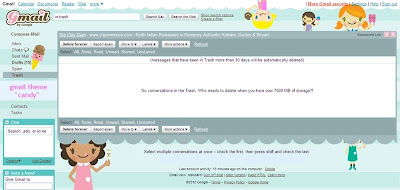 say hello to my NEW gmail homepage theme! me likey! :)i've always customised my igoogle homepage, didn't realise we could do that on gmail interface too! (hehe.. yes i'm so blur.. but never too late to find out, i guess) :)just customised my gmail look and i simple loveeee the cutesy "candy" theme that greets me everytime i log in now. so cheerful and perfect for Spring! :D i know it looks a little kiddish but who cares? hehehe..if you too, like me, are just discovering gmail themes for the first time.. here's how you do it:step 1) log in to your gmail account (via www.gmail.com)step 2) select "Settings" from the top right hand corner tab on the screenstep 3) click on "Themes" at the far right of the Settings menu bar step
step 4) select your preferred theme from the icons listed.. and voila!easy as 1, 2, 3 :)


 also switched up my blogspot theme yesterday..
 say hello to my NEW gmail homepage theme! me likey! :)
